


GetCode - Virtual Number SMS
4.315.29K Reviews
App Specs
- Version
- 3.11.2
- Updated On
- License
- Free
- Downloads
- 1,000,000+
- Developer
- MIA DIGITAL SOLUTIONS
- Categories
- Communication
- Platform
- Android, iOS
Screenshots


 Analysis by AppCompare
I’d judge a virtual-number app less by how quickly it displays a code and more by how it behaves when a verification text is delayed, a number is unavailable, or a service rejects it. That is where the difference between a useful extra inbox and a frustrating detour becomes clear. GetCode - Virtual Number SMS is aimed at people who want another number for receiving one-time passwords and separating some online sign-ups from their personal line, but it works best when you treat that number as a convenience rather than a guaranteed replacement for your SIM.
Where people can get stuck
The main point of friction with any virtual number is that the outside service controls whether it will send a code to it. A platform may accept one number and reject another, or a message may take longer than expected. If a code does not arrive, that does not automatically mean the app is broken; the service you are registering with may not support that number for verification.
I would also avoid assuming that a number used for a quick sign-up is a dependable long-term account recovery method. A virtual number is not the same thing as a personal mobile line that you control indefinitely. Before using one for an account you cannot afford to lose, check whether you can add another recovery method, such as an email address or an authenticator, and keep those details current.
Small checks before requesting a code
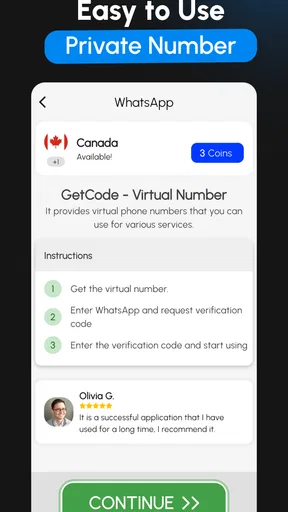
When I need a verification message, I first check that I selected the intended country and number, then confirm that the service’s country and phone-number requirements match. I enter the number exactly as GetCode presents it, including the country prefix if the service asks for one. Repeatedly changing formats or tapping resend in quick succession can make it harder to tell whether the problem is the number, the service, or simply a delay.
It is also worth checking that I am looking at the correct number’s message area before deciding nothing has arrived. If I manage more than one number, keeping a note of which number I used for each non-sensitive sign-up saves time later. I would not put passwords or verification codes in that note; the useful detail is simply which number was tied to which account.
A calmer way to recover a stalled workflow
If a code is slow, I give the service a little time and check its own instructions before requesting another. If the service offers a different verification route, I consider using it rather than repeatedly triggering SMS requests. When a number is refused, I try a different supported route only if the service allows it, instead of assuming that every available virtual number will work everywhere.
For an account that matters, I finish setup while I still have access to the number and immediately add a separate recovery option where the service permits it. That small step can prevent a temporary convenience from becoming a future lockout. For low-stakes registrations, a virtual number may be enough; for banking, essential work accounts, or anything tied to identity checks, I would favor the provider’s recommended recovery method and a number I control directly.
Worth Reading Before You Choose

Flipboard Shows What News Apps Must Do Beyond the Feed

Switching to Android Auto Means Rethinking Your Driving Routine

Google Calendar Makes a Crowded Week Easier to Manage

Ludo King Makes the Most of the Minutes Between Plans

Baby Panda World Brings Quick Play to Modern Phones, but Its Game Library Feels Busy

ESPN’s Live Game View Makes Following Close Games Easier
When the app may not be the cause
SMS verification depends on several parties: the app providing the number, the service sending the code, and the network systems carrying the message. A missing text can come from the sender’s rules or delays, not just from the screen you are checking. Likewise, some services are designed to restrict virtual or shared numbers, so trying another number is not always a reliable fix.
That distinction matters because it sets realistic expectations. GetCode can help you keep your everyday number out of some sign-up forms, but it cannot make a third-party platform accept a number it chooses to block. If a service repeatedly refuses virtual numbers, using its supported phone option or another verification method is usually a better use of your time.
Why You Might Want a Virtual Number
We all know how frustrating it can be to get spammed with texts or calls, right? Whether it’s from signing up for a new service or just random spam, sometimes you just want to keep things separate. That’s where GetCode - Virtual Number SMS truly shines. It provides you with a temporary number that you can use to receive SMS and verify accounts without giving out your real number. Pretty neat, huh?
Setting Up and First Impressions
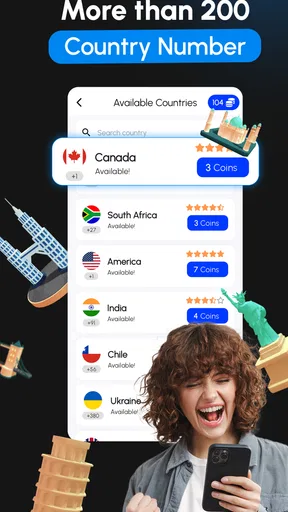
Getting started was a breeze. After downloading the app, the setup process was straightforward. I was quickly able to choose a virtual number from a list of available countries. The interface is user-friendly, and even if you’re not tech-savvy, navigating through the app is a piece of cake.
One thing that caught my attention was how clean and intuitive the design is. No clutter, no unnecessary frills – just what you need, right where you need it. I can’t stress enough how much I appreciate when an app delivers on simplicity.
Features That Stand Out
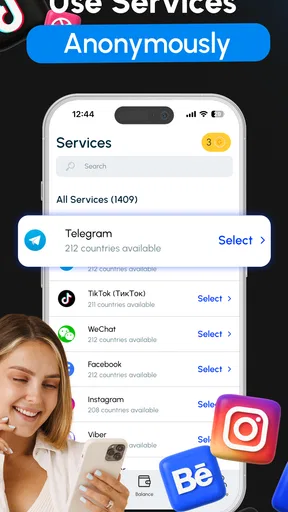
Let’s talk features. So, the app offers a bunch of handy options. You can use your virtual number for receiving SMS from various platforms like social media networks, messaging apps, or even online shopping sites. This is especially useful if you frequently sign up for online services or need verification codes.
Another cool feature is the ability to manage multiple numbers. This is great if you’re juggling different accounts or need numbers from different countries. Honestly, it felt like having multiple SIM cards without the hassle of swapping them out.
"It’s like having a Swiss Army knife for your communication needs."
Practical Uses and Scenarios
Now, you might be wondering, "When would I actually use this?" Well, think about all those times you’ve hesitated to enter your phone number online. With this app, you can bypass that worry. And if you’re traveling, having a local number without needing a new SIM card is super convenient.
Also, for those of us who run businesses or side gigs, keeping work and personal communication separate is a breeze. It’s like having a dedicated business line without the extra cost.
What About Privacy?
Privacy is a big deal, and GetCode - Virtual Number SMS takes it seriously. The app ensures that your real number stays hidden, and they have policies in place to protect your data. It’s reassuring to know that they’re not just tossing your info around.
Plus, there’s no need to worry about unwanted calls or messages once you’re done using a number. You can easily dispose of it and move on. It’s like having a burner phone without the actual phone.
Choosing it over a SIM or another inbox
Compared with a second physical SIM, a virtual number avoids carrying another card or changing phone settings, which is handy if you only need occasional verification. A separate email address is simpler for services that allow email-only sign-up, but it cannot replace SMS when a phone number is specifically required. I see this app as a middle option: more convenient than buying another line for a one-off task, but less dependable than a personal number for accounts that need continuing access.
One practical use is registering for a low-stakes shopping account when I want order-related sign-up messages kept apart from my main number. Another is testing a new online service before deciding whether it deserves a lasting place in my personal contact details. For a side project, it can also help create some separation, though I would not present it as a full business phone system or rely on it for calls and ongoing customer support.
Who benefits, and who should look elsewhere
I think the best fit is someone who understands the limits of SMS verification and wants a convenient extra number for selected registrations. It may also suit a traveler who wants to try a country-specific option without immediately arranging another SIM. Availability and acceptance still depend on the service involved, so I would check the target service’s rules before building a whole workflow around a number.
I would skip it as the sole contact method for important accounts, account recovery, financial services, or any situation where losing access would cause serious trouble. If you need a number that people can reliably reach over time, or one tied closely to your identity, your regular mobile provider is the safer choice. For a service that supports email or an authenticator, those may be better than SMS regardless of which number app you use.
Price, support expectations, and what to check
The app is free to install, while in-app purchases range from $0.99 to $214.99 per item, so I would look closely at the specific option and its terms before paying. I would not treat the free download as proof that every number or use is free. Since a virtual number’s usefulness depends on the particular country and receiving task, it makes sense to confirm what you are selecting before committing to a purchase.
GetCode comes from MIA DIGITAL SOLUTIONS, is rated for Everyone, and its current version is 3.9.3, with Android 7.0 as the minimum operating system. It has a 4.4 average from around 307,000 ratings, and more than a million installs. Those figures suggest that many people have tried it, but they do not guarantee that a particular service will send a code to a particular number; that compatibility question is the one I would resolve first.
My Final Thoughts
Overall, I’ve found GetCode - Virtual Number SMS to be an incredibly useful tool. It’s versatile, easy to use, and addresses a real need in today’s digital world. Whether you’re a frequent traveler, a business owner, or just someone who values their privacy, this app is worth checking out.
So, if you’re ready to take control of your communications and protect your privacy, give this app a try. You can find the download link on their official site or through your device’s app store. Happy texting!
A practical verdict before you rely on it
In a realistic everyday scenario, I might use a virtual number for a newsletter-linked shopping account, check whether the verification text arrives, and then save a separate recovery route before making any purchase or storing important account details. If the text never appears, I would pause, confirm the number and country, and check the service’s help options rather than treating repeated resend attempts as a solution. That approach makes the app useful without asking it to solve a problem controlled by another platform.
GetCode is a focused communication app, not a substitute for every part of a mobile plan. MIA DIGITAL SOLUTIONS released it on July 8, 2023, and the app’s appeal is straightforward: access to a second number for SMS-based tasks. I would recommend it to someone who values separation and can tolerate occasional compatibility friction, while keeping a regular number or another recovery method for anything important. Used with that boundary in mind, it can be a practical tool rather than a single point of failure.
Pros
- User-friendly interface for easy navigation.
- Supports multiple countries for virtual numbers.
- Quick setup for receiving SMS instantly.
- Affordable pricing for various plans.
- No need for a physical SIM card.
Cons
- Limited free trial options available.
- Some numbers may be recycled quickly.
- Inconsistent SMS delivery in certain regions.
- Support response can be slow at times.
- Requires internet connection to function.
FAQs for GetCode - Virtual Number SMS
What is GetCode - Virtual Number SMS used for?
GetCode - Virtual Number SMS is an app that provides users with virtual phone numbers to receive SMS messages. This can be particularly useful for privacy, managing multiple accounts, or bypassing verification processes without using your personal number.
How do I get a virtual number on GetCode?
Once you download and install GetCode, you can select a virtual number from a list of available countries. The app allows you to choose numbers based on your needs, making it easy to manage communications without revealing your personal information.
Is GetCode - Virtual Number SMS secure?
Yes, GetCode prioritizes user privacy and security. The app ensures that your personal data is protected while using virtual numbers. However, it's important to be cautious and not use virtual numbers for sensitive transactions or communications.
Can I use GetCode for free?
GetCode offers both free and premium options. The free version provides limited access to virtual numbers, while the premium version unlocks more features and additional numbers. Users can choose the plan that best fits their needs, based on the frequency and purpose of use.
Which platforms support GetCode - Virtual Number SMS?
GetCode is available for both Android and iOS devices. Users can easily download the app from Google Play Store or the Apple App Store, ensuring compatibility with most smartphones and tablets.


